Fleet Safety Platform

Emergency mode.Evidence captured.Fleet-ready reports.

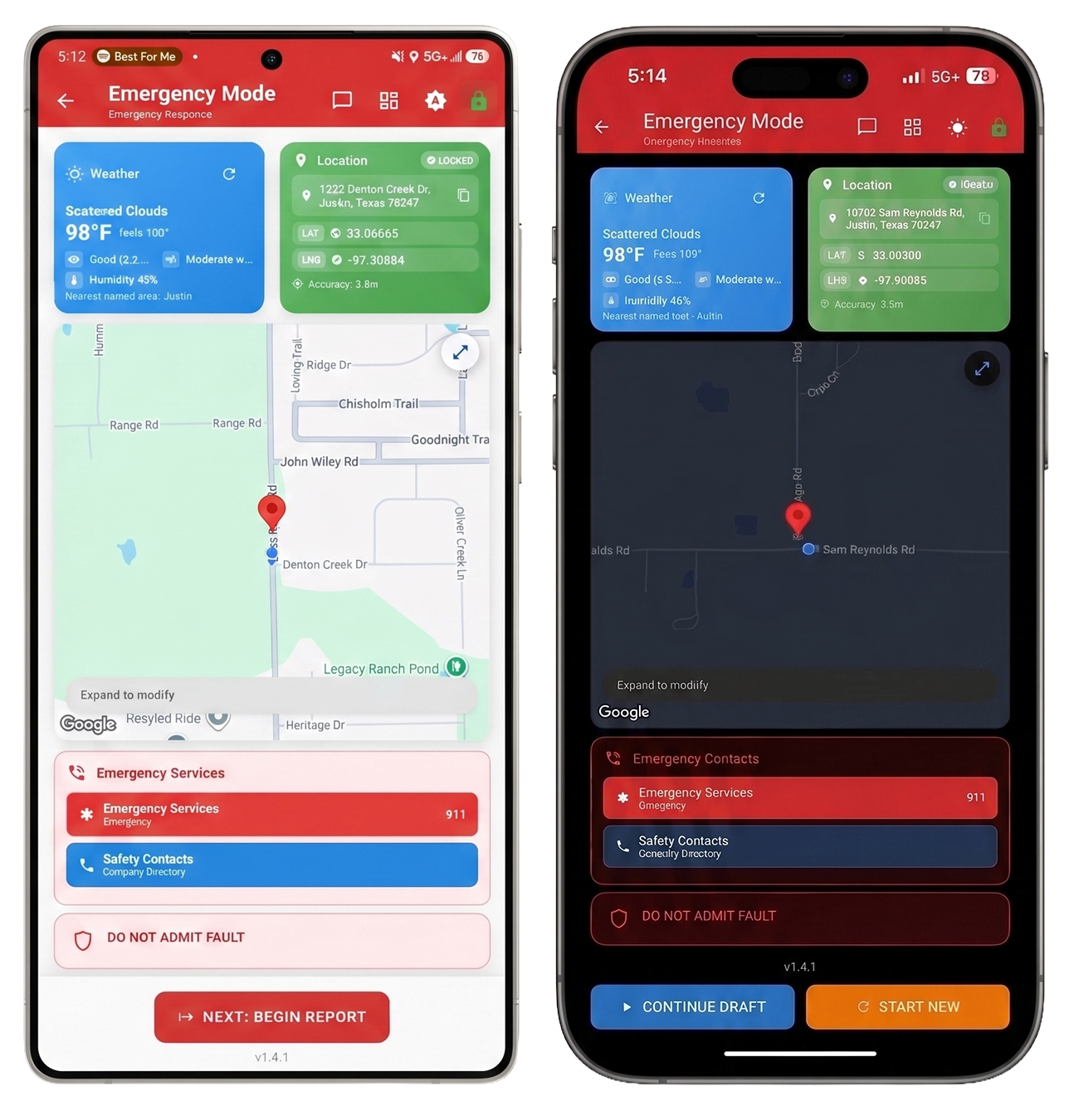
CrashTrak gives drivers a focused emergency screen with live weather, locked GPS location, map context, emergency contacts, and a guided crash workflow. Fleet staff review the resulting PDFs, evidence, damage details, map views, and archived report data in the same admin shell in Chrome, Edge, or Safari on Windows and Mac, while drivers capture on Android and iPhone where your fleet provisions those apps.

View pricingFleet portal overview →
CrashTrak Emergency Mode on a phone: weather, locked location fields, map, emergency contacts, and report actions

Reports Filed

Companies Protected

0

States

How It Works

Three phases. Zero gaps.

The current build connects driver response, structured evidence capture, and the fleet review workspace into one flow.

📍

Step 01

Respond

Emergency Mode gives drivers the essentials first: weather, locked location, map context, emergency contacts, and a clear next action.

  • Locked GPS coordinates
  • Weather and visibility context
  • Emergency contacts
  • Do-not-admit-fault reminder
📋

Step 02

Document

The crash workflow walks through the evidence package: photos, damage diagrams, third-party details, police information, witnesses, and scene notes.

  • Vehicle and trailer damage points
  • Police, witness, and injury fields
  • Photo and audio evidence
  • Scene diagram and map capture
🚀

Step 03

Review

Submissions land in the fleet workspace for full-screen review, evidence browsing, map inspection, archive actions, and user management.

  • Full report reader
  • Evidence gallery and vault
  • Resizable portal workspace
  • Same shell in Chrome, Edge, or Safari on Windows and Mac

Workspace capabilities

Built for the crash workflow

CrashTrak connects the driver's emergency workflow with the fleet team's review, evidence, map, and archive tools.

Mobile

Emergency Mode is front and center

Drivers start with weather, locked location, map context, emergency contacts, and a clear path to continue or start a report.

Portal

Report review is richer

The portal now shows the full review-style information set inside the newer resizable layout, including damage details, location, legal, witnesses, injuries, and captured evidence.

Workspace

Evidence is easier to inspect

Fleet users can browse photos, open PDFs, use archive actions, review map context, and work from the same shell in Chrome, Edge, or Safari on Windows and Mac.

Live fleet workspace

The driver workflow and admin review desk now meet in one place.

Drivers capture the incident on Android and iPhone. Fleet teams review reports, evidence, maps, users, billing, and archive state in Chrome, Edge, or Safari on Windows and Mac.

View pricingFleet portal overview